Insightech and Insider One

Overview
Insider is a leading solution for developers and marketers to build and run website experiences and A/B testing campaigns. It is highly effective at measuring success against key metrics predetermined by the user.
This integration allows Insider's A/B testing data to flow into Insightech, giving you access to dynamic click maps, session replays and segmentation tools filtered by A/B testing experience - including individual campaigns, variants, and control vs. test groups.
This allows marketers and designers to understand how each experience impacts success metrics, and how it drives different user behaviours, to support better iterative design.
This Document Covers
- What the integration does, and the data it makes available in Insightech
- Who is responsible for each part of the setup — you, your Insider representative, or Insightech
- How to configure Insider to push campaign and variation details into the dataLayer
- How to verify the integration is working correctly
- How to build segments in Insightech using this data
- Troubleshooting steps if events aren't appearing as expected
What This Integration Does
Insider fires a dataLayer event each time an A/B test is initialised for a visitor. Because Insightech captures all dataLayer events automatically, no additional Insightech configuration is required to start collecting this data — only Insider needs to be configured to push it.
Each event should include:
- Event Name - A fixed identifier marking the push as an Insider experience event (e.g. Insider Event Detail)
- Builder ID - The unique identifier for the Insider campaign/experience (e.g. builderId)
- Variation ID - The unique identifier for the specific variant the visitor was bucketed into (e.g. variationId)
- Control Flag - Whether the visitor is in the control group or a test variant (e.g. isControlGroup)
This enables Insightech to:
- Segment by experience - Build audiences of visitors exposed to a specific Insider campaign, variant, or control group
- Filter click maps and replays - Isolate on-page behaviour for a single variant to see exactly how an experience change affects real user interactions
- Compare behavioural outcomes - Understand how each variation impacts downstream engagement, not just the primary success metric tracked in Insider
- Support qualitative QA - Use session replays to sanity-check that a variant is rendering and behaving as intended for the audience it was served to
Roles - Who Does What
This integration spans two platforms, so it's easy for a step to fall between teams. Use this table to confirm ownership before you start.
Task | Owner | Notes |
Confirm Insider account has access to add custom code to experiences (or that GTM is available) | Customer | Usually an Insider admin or the team managing the GTM container |
Build and configure the dataLayer push script for each experience/campaign | Insider representative | Your Insider CSM or implementation contact adds this within the Insider platform — see Step 1 |
Confirm the standard Insightech tracking snippet is live on the site | Customer | Prerequisite — see Prerequisites section |
Capture and store dataLayer events | Insightech (automatic) | No configuration needed once the events are firing |
Verify the event structure in the browser console | Customer | See Verifying the Integration Is Working |
Build custom events and segments in Insightech | Customer | See Setting Up / Configuring Insightech |
Prerequisites
Before starting implementation, confirm the following:
- The standard Insightech tracking code must already be installed on your website. See Implement Your Tracking Code if this hasn't been done yet.
- Your Insider account must be live on the pages where you want AB testing data to appear in Insightech.
- You will need either: access to add a custom HTML/JS action within Insider, or a Google Tag Manager (GTM) container where Insider already fires, so the script can be added as a tag.
- If your site uses a dataLayer object under a non-standard name, you'll need to configure this in Insightech first. See Set Up your Custom Data Layer.
Implementation Steps
Use the dataLayer code snippet below to enable your Insider experience data to pass through into your website's dataLayer. Once this is live, Insightech will automatically pick up the events — no separate Insightech-side tagging is required.
Step 1: Configure Insider to Push Campaign & Variation Details into the DataLayer
- Reach out to your Insider representative (or your internal Insider admin) and share the code snippet in Step 2 below.
- The script is added as a Custom HTML/JS action on each Insider experience, either directly within the Insider platform, or as a tag in Google Tag Manager set to fire whenever Insider initialises an experience.
- Insider will need to map the placeholders in the script ({{builder_id}}, {{variation_id}}, {{is_control}}) to the corresponding values for each live experience — these are typically available as Insider's own template variables.
- Once enabled, this will fire for every visitor who is bucketed into an active Insider experience — both control and test groups — the moment the experience initialises.
Step 2: Example DataLayer Push Code
This is a reference implementation. Your Insider representative will adapt the variable references to match your account's setup, but the resulting dataLayer push should keep this structure and these field names.
window.dataLayer = window.dataLayer || []; window.dataLayer.push({ event: 'Insider Event Detail', builderId: '{{builder_id}}', variationId: '{{variation_id}}', isControlGroup: '{{is_control}}', }); |
Please note:
- Each active Insider experience should be sent as its own separate dataLayer event — not bundled together as one array.
- All values must be sent as strings (not integers or booleans) — for example 'False', not false.
- The event should fire once per experience initialisation, not on every page view, to avoid inflating segment counts.
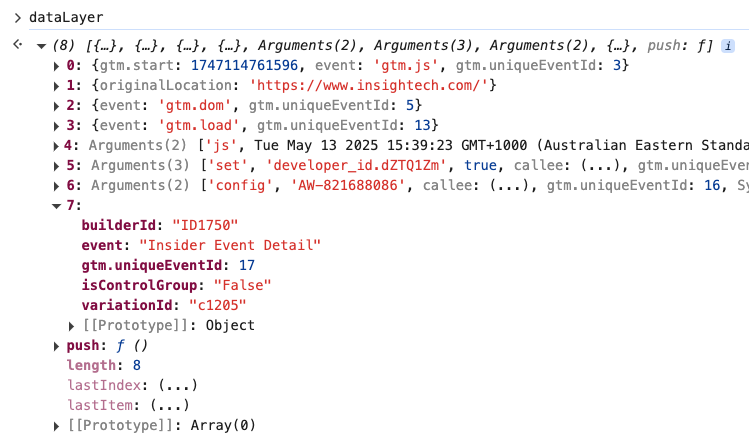
Once this has been enabled, you will begin to see your Insider campaign and variation details appear in your dataLayer, similar to the example below.
What your dataLayer object should look like (example)
Understanding the DataLayer Event
This integration pushes an Insider Event Detail event to the dataLayer for each active experience a visitor is bucketed into.
{ event: 'Insider Event Detail', builderId: 'ID1750', variationId: 'c1205', isControlGroup: 'False', } |
Field | Example Value | Description |
event | 'Insider Event Detail' | Fixed event name used to identify this push in the dataLayer |
builderId | 'ID1750' | The unique ID of the Insider campaign/experience |
variationId | 'c1205' | The unique ID of the specific variant shown to this visitor |
isControlGroup | 'False' | Whether this visitor is in the control group ('True') or a test variant ('False') |
Setting Up / Configuring Insightech
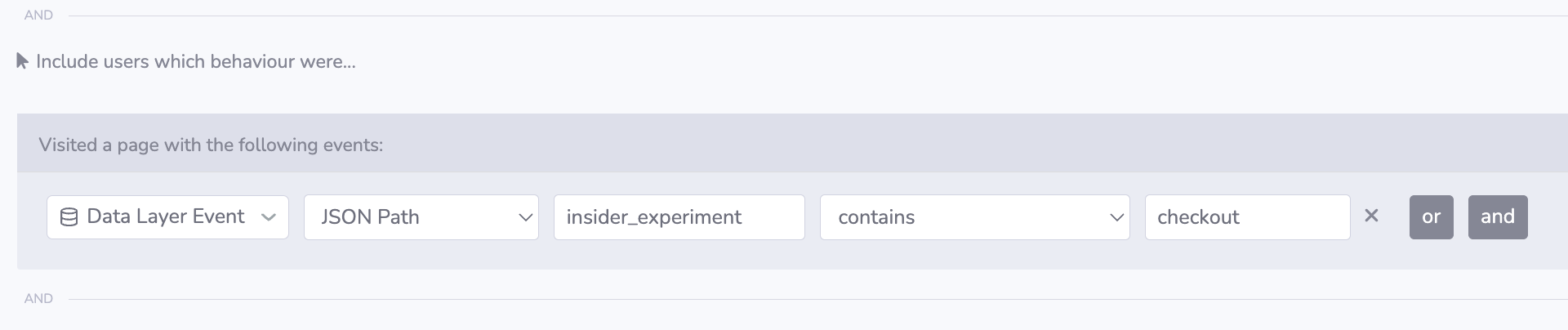
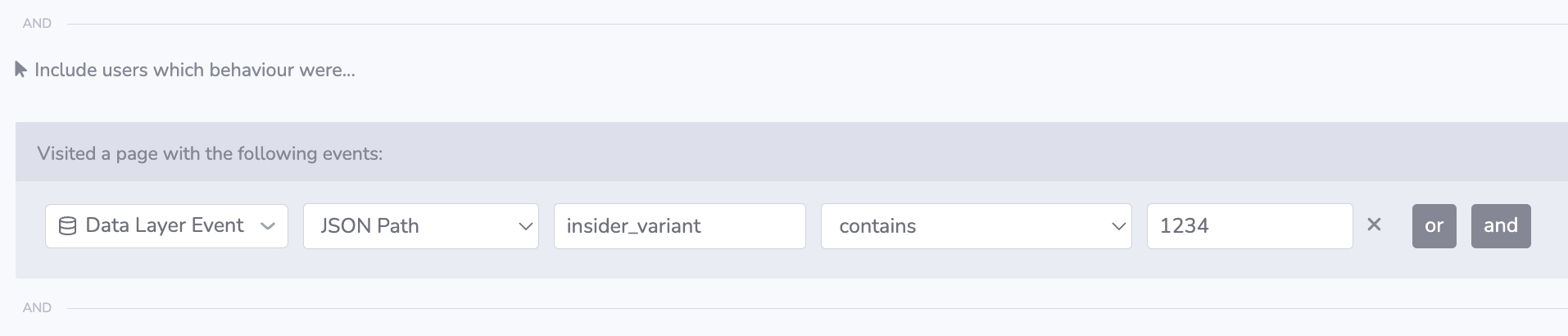
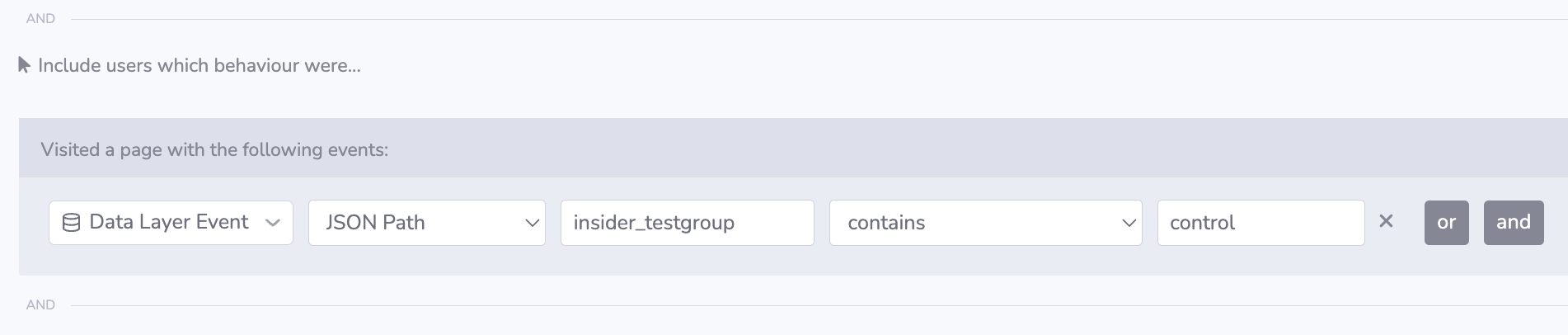
Once the integration is live, Insightech will automatically capture the dataLayer events — no additional Insightech-side tagging is required to start collecting the data. To test whether the implementation is working correctly, create a segment in Insightech to bucket users exposed to a specific (active) Insider experience, based on your dataLayer.
Below are example segments based on Insider dataLayer attributes:
1. Insider Experiment / Builder ID
2. Insider Variant ID
3. Insider Control vs. Test Group
For more detail on building segments generally, see Set Up your Custom Data Layer.
Recommended Field Mapping
Insightech Field | Insider DataLayer Field | Notes |
Event Name | event | Always 'Insider Event Detail' |
Experience / Campaign ID | builderId | Use to segment by a specific Insider campaign |
Variant ID | variationId | Use to compare individual variants within a campaign |
Control Group Flag | isControlGroup | Use to isolate control vs. test group behaviour |
Verifying the Integration is Working
- Open your website in a browser, on a page where an Insider experience is live.
- Open the browser developer console (F12, or right-click → Inspect → Console).
- Type dataLayer and press Enter.
- Look for an Insider Event Detail event in the output for each active experience on the page.
- Confirm the data structure matches the example in this document, and that builderId, variationId and isControlGroup reflect the experience you expect to be running.
- In Insightech, apply one of the segments from the previous section and confirm it returns matching sessions.
✓ If multiple experiences are running simultaneously, you should see a separate event for each one.
Troubleshooting
When DataLayer Events are Not Appearing
Confirm the Insider custom code action is live
- Check with your Insider representative that the custom code action (or GTM tag) has been published and is set to fire on the pages you're testing.
- Confirm the experience is actually active in Insider for the visitor/segment you're testing with — draft or paused experiences will not fire.
Confirm the standard Insightech tracking code is installed
- Open the browser console and type dataLayer. If this returns undefined, the dataLayer object hasn't been initialised on the page — check the Insightech tracking snippet is installed correctly.
When Segments Return No Results
Check the field names match exactly
- Confirm the JSON Path used in your Insightech segment matches the exact field name Insider is pushing (case-sensitive) — see the note under Setting Up / Configuring Insightech.
- Check the values are being sent as strings, not booleans or integers — a segment filter looking for 'False' won't match a pushed value of false.
If Events are Firing Multiple Times Per Experience
Check for duplicate custom code actions
- Confirm the custom code action has only been added once per experience in Insider.
- If the same experience is also being fired via a duplicate GTM tag, remove one of the two triggers.
Quick Reference: DataLayer Fields
Field | Type | Example | Description |
event | String | 'Insider Event Detail' | Fixed event name |
builderId | String | 'ID1750' | Insider campaign/experience ID |
variationId | String | 'c1205' | Insider variant ID |
isControlGroup | String | 'False' | 'True' for control, 'False' for test variant |
For support, contact Insightech at support@insightech.com or visit insightech.com/support