Insightech and Convert.com

Overview
Convert.com is a leading solution for building and measuring A/B testing campaigns. It is focused on measuring the statistical success of improvements you make to your website.
This document explains how to integrate Convert.com A/B testing data with Insightech by pushing experiment and variation information into the website's dataLayer.
What This Integration Does
The integration automatically captures and sends Convert.com A/B test data to your dataLayer the moment Convert decides which variation a visitor should see, allowing Insightech to automatically capture these details.
This includes:
- Experiment ID — Which A/B test is running
- Variation Name — The name of the variation each visitor is seeing
- Variation ID — The Convert.com variation identifier
- Experiment Name — The human-readable name of the experiment in Convert
This enables Insightech to:
- Unify your data: Combine A/B tests data with behavioral analytics in Insightech
- Create advanced segments: Build audiences based on specific tests, variants, and audiences
- Behavioural Attribution: Understand how tests impact downstream metrics like other on-page user engagement, AOV, and conversions
- Explore Successful / failed tests: Explore additional on-page behaviours and customer journeys to understand why tests succeeded/failed, to inform further improvements
Implementation Steps
The below steps will embed code inside Convert's Global Project JavaScript to integrate with your website DataLayer, and Insightech.
Add the code below to Convert.com's Global Project JavaScript field.
Steps to Add into Convert.com
- In the Convert app, navigate to: Projects → [select your project] → Project Configuration → Global Project JavaScript.
- Paste the snippet.
- Save, and deploy the project.
Once saved, your existing and future AB tests will be integrated with your website dataLayer, and Insightech.
Note: The method above is preferred over implementing in GTM or directly in your website, so that every time an AB test loads in Convert, it will automatically load your test and variation details into the integration.
<script>
(function () {
  window.dataLayer = window.dataLayer || [];
  window._conv_q = window._conv_q || [];

  // Listen for Convert's own lifecycle event. Fires once each time
  // Convert decides which variation the visitor should see.
  window._conv_q.push({
    what: 'addListener',
    params: {
      event: 'experience.variation_decided',
      handler: function (event) {
        try {
          var data = (event && event.data) || {};
          window.dataLayer.push({
            event: 'convert-trigger-experiment',
            experiment_id: data.experience_id,
            variation_id: data.variation_id,
            // Optional extras for downstream reporting:
            variation_name: data.variation_name,
            experiment_name: data.experience_name
          });
        } catch (e) {
          if (window.console && console.warn) {
            console.warn('convert-trigger-experiment push failed', e);
          }
        }
      }
    }
  });
})();
</script>
Understanding the DataLayer Events
This integration pushes one event type to the dataLayer:
Event 1: `convert-trigger-experiment`
Fires once each time Convert decides which variation a visitor should see. If a visitor is enrolled in multiple experiments on the same page, the event fires once per experiment — one dataLayer entry per experiment/variation pairing.
{
  event: 'convert-trigger-experiment',
  experiment_id: '1234567',       // Convert experiment ID
  variation_name: 'Variation A',  // Name of the variation shown
  variation_id: '9876543',        // Convert variation ID
  experiment_name: 'Homepage hero' // Name of the experiment
}
When the event fires
The event is triggered by Convert’s own experience.variation_decided lifecycle event, which fires the moment Convert resolves the visitor’s variation assignment — before any DOM changes are applied, and exactly once per experiment decision per page view. Because the listener is registered via Convert’s async queue (_conv_q), timing is guaranteed regardless of script load order.
Setting Up / Configuring Insightech
Once the integration is live, Insightech will automatically capture the dataLayer events being fired.
To test whether the code implementation is working correctly with Insightech, you should create a specific segment in Insightech to bucket users with a specific (active) Convert experience based on your dataLayer.
Here are some example segments using Convert attributes:
1. Convert AB Test Event
Datalayer Event Name = 'convert-trigger-experiment'

2. Convert - Experiment ID
Datalayer JSON Path = experiment_id
AND contains '<your convert experiment ID>'

3. Convert - Experiment Name
Datalayer JSON Path = experiment_name
AND contains '<your convert experiment name>'

4. Convert - Variation ID
Datalayer JSON Path = variation_id
AND contains '<your convert variation ID>'

5. Convert - Variation Name
Datalayer JSON Path = variation_name
AND contains '<your convert variation name>'

Click here for more information on setting up your dataLayer in Insightech
To Verifying the Integration Is Working
- Open your website in a browser on a page where a Convert.com experiment is running.
- Open the browser's developer console (F12 or right-click > Inspect > Console).
- Type dataLayer and press Enter.
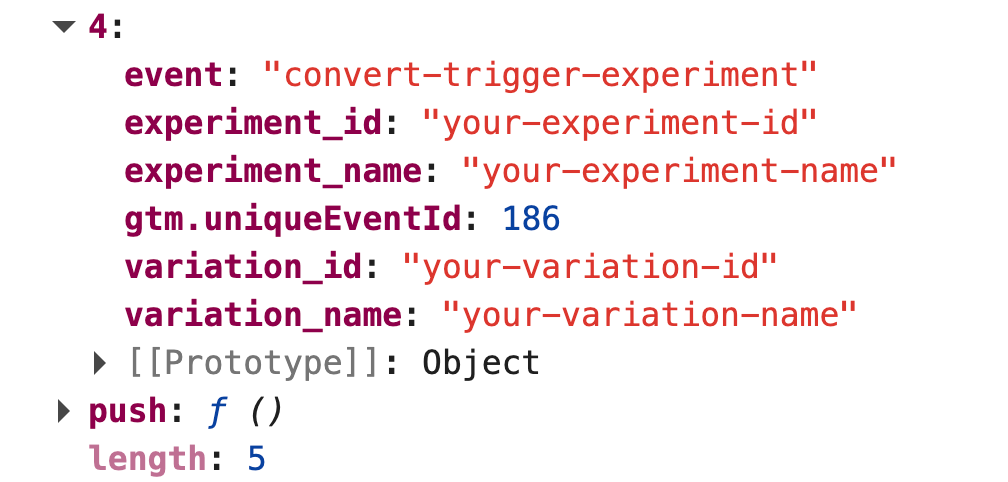
- Look for 'convert-trigger-experiment' events.
- Verify the data structure matches the example above.
Quick filter command to list only Convert events:
window.dataLayer.filter(function (e) { return e.event === 'convert-trigger-experiment'; });You should see one entry per decided experiment, with experiment_id, experiment_name, variation_id and variation_name populated dynamically from the test in Convert.
You should see the initial AB Test datalayer event
When DataLayer Events Are Not Appearing
Verify that Convert is loaded:
- Open the browser console and type window.convert.
- It should return an object. If it is undefined, the Convert tracking script is not installed or has not loaded yet.
- Also type window._conv_q — this should exist as an array or a Convert queue object.
Check for JavaScript errors:
- Look for errors in the browser console related to the snippet.
- Confirm the snippet was pasted into Global Project JavaScript (not Experience JavaScript) and that the project has been deployed.
Confirm the listener is attached:
- In the console, force a page reload, then inspect the dataLayer array immediately after load.
- If no convert-trigger-experiment entry appears, the visitor may simply not have been bucketed into any running experiment on that page.
When There is No Test Data in Events
Verify the experiment is running:
- Check the Convert.com dashboard to confirm the experiment is Active.
- Ensure the visitor meets the experiment targeting criteria.
If Events Are Firing Multiple Times
Check for duplicate code:
- Ensure the snippet is only pasted into Global Project JavaScript once.
- Remove any duplicate copies from Experience-level JavaScript, GTM Custom HTML tags, or the site source.
Expected behaviour: The event fires once per experiment decision per page view. If a visitor is bucketed into two experiments on the same page, you will correctly see two entries — one per experiment.
Our list of integrations is updating weekly. If you want to know if we integrate with your preferred platform, please get in touch with us here.