Insightech and Adobe Target

Overview
Adobe Target is a leading solution for web marketers and UX designers to perform A/B testing campaigns. It is extremely effective in measuring success based on key success metrics predetermined by the user.
This integration allows users to access dynamic click map tools from Insightech to filter out data based on a range of specific conditions and segments, including A/B testing experiences.
This allows marketers and designers to understand how each experience impacts the success metrics and also how it drives different user behaviours for better iterative designs.
How Adobe Target Works with Dynamic Click Maps
The Insightech/Adobe Target integration pushes the Adobe Target experience IDs into the data layer object, which is tracked by Insightech. In the Insightech UI, you can create segments based on the campaign names and experience names as the screenshot shows below.

This filters out traffic to only show the sessions that fall into the experience. From there, it presents the Dynamic Click Maps in the experience automatically with the interaction data.
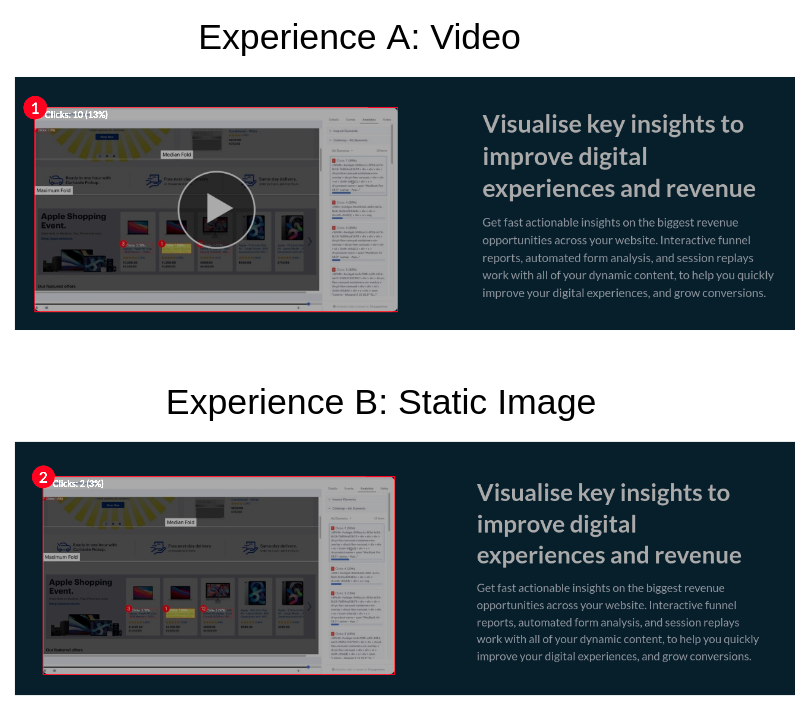
By looking at the click maps of the two experiences in the example campaign below, we can clearly see the different click rates in the two designs. The video experience achieved a 13% click rate while the static image experience only got a 3% click rate.
How do you add & enable the Insightech Integration with Adobe Target?
Integrating Adobe Target with Google Tag Manager (GTM) or any other tag manager enables you to push your Adobe Target campaign data to Insightech and other analytics tools.
To do this, you would need to enter the relevant code snippet right after at.js so that it can listen to the Adobe Target response.
Note: The integration requires installation of the Insightech Adobe Target Plugin in your tag management system such as Adobe Launch. It also requires Adobe Target to be running with the at.js 2.x or later versions.
Code Snippet
Below is the code snippet that needs to be integrated into your website:
var dataLayerName="dataLayer";
document.addEventListener(adobe.target.event.REQUEST_SUCCEEDED,function(e){
  if(void 0!==e.detail&&void 0!==e.detail.responseTokens&&0<e.detail.responseTokens.length){
    window[dataLayerName]=window[dataLayerName]||[];
    for(var a=[],n=0;n<e.detail.responseTokens.length;n++){
      var t=e.detail.responseTokens[n],
          i={
            targetCampaignName:t["activity.name"]||"no-campaign",
            targetCampaignId:t["activity.id"]||"no-campaign",
            targetExperienceName:t["experience.name"]||"no-exp",
            targetExperienceId:t["experience.id"]||"no-exp"
          },
          d=JSON.stringify(i);
      a.includes(d)||(a.push(d),window[dataLayerName].push(i))
    }
  }
});
Our list of integrations is updating weekly. If you want to know if we integrate with your preferred platform, please get in touch with us here.